If you are using IE8 and IE7 you cannot download more than two files from a server from internet without third party plugins like IDM,FlashGet.
So to download more than two files from a server in single time you have to change the registry values by Regedit
Steps :-
1. Go to Start --- Run ---regedit
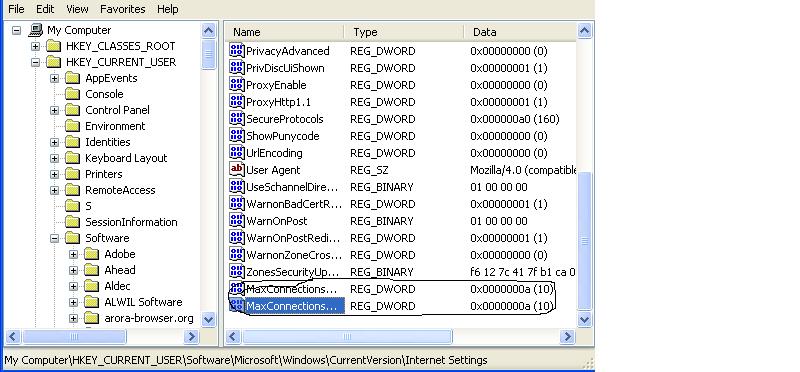
2.in Registry go to Mycomputer ----HKEY_CURRENT_USER\ Software\Microsoft\Windows\Current Version\InternetSettings
3.Right Click on the Internet Settings and create a Dword MaxConnectionsPerServer give a value in decimal as 10 by change the binary value.
4.Create another Dword MaxConnectionPer1_0Server and give the Value in Decimal as 10.
thus the work is over and enjoy multiple downloads from a server without third Party Plug ins
Showing posts with label Registry Tricks. Show all posts
Windows Media Player Error while Connecting to internet
When Windows media Player is connected to internet for some online update or what so ever. It is not connecting to Internet and showing a error message on the screen
Windows Media Player Error C00D10B3
This can be trouble shooted by simply editing the registry.
do the following steps
1.go to Start----Run----regedit
2.go to HKEY_CURRENT_USER\Software\Microsoft\MediaPlayer\Preferences
3. create a new Dword ForceOnlineby right clicking on preferences and give value 1
then from now you cannot get error message
Windows Media Player Error C00D10B3
This can be trouble shooted by simply editing the registry.
do the following steps
1.go to Start----Run----regedit
2.go to HKEY_CURRENT_USER\Software\Microsoft\MediaPlayer\Preferences
3. create a new Dword ForceOnlineby right clicking on preferences and give value 1
then from now you cannot get error message
Labels:
MediaPlayer errots,
Registry Tricks,
w,
windows
My Network connection Icon or option Disappered in control Pannel What should I do?
If Networking Settings options in Control Pannel Disappeared then we have a trick in registry by Editing the registry in Windows Operating System
follow the given steps
1. Go to Start --- Run ---regedit
2.go to HKEY_CURRENT_USER\Control Panel\don't load
3.go to right side frame and find the string ncpa.cpl string and delete it
follow the given steps
1. Go to Start --- Run ---regedit
2.go to HKEY_CURRENT_USER\Control Panel\don't load
3.go to right side frame and find the string ncpa.cpl string and delete it
Labels:
Registry Tricks
I cannot see Administrator in Windows Login Screen
When we boot Windows Operating System .In login or Welcome Screen Administrator account or user name is not Appearing then we must change or add a new value in registry editor
.
following steps should be done.
1. goto Start --- Run ----regedit.
2. goto key HKEY_LOCAL_MACHINE\SOFTWARE\Microsoft\Windows NT\CurrentVersion\Winlogon\SpecialAccounts\UserList
3. Create a Dword name Administrator an give a value 1 by double clicking on it
.
following steps should be done.
1. goto Start --- Run ----regedit.
2. goto key HKEY_LOCAL_MACHINE\SOFTWARE\Microsoft\Windows NT\CurrentVersion\Winlogon\SpecialAccounts\UserList
3. Create a Dword name Administrator an give a value 1 by double clicking on it
Labels:
Registry Tricks
Subscribe to:
Posts (Atom)