How to add customized pictures to user accounts in windows 7

just got a new computer with Windows Vista pre-installed. In XP, I used to be able to add custom .bmp pictures to the Default Pictures folder (C:\Documents and Settings\All Users\Application Data\Microsoft\User Account Pictures\Default Pictures) and then they would show in the choices when selecting a user account picture. Where are the picture files stored in Vista?

This article tells you how to add your custom pictures to the list of user account pictures in Windows Vista.
Adding custom pictures to the list

The default user account pictures are stored in the following location:

C:\ProgramData\Microsoft\User Account Pictures\Default Pictures

You can add your custom pictures to the above location so that the user accounts applet lists them automatically. Ensure that the dimension of the picture is 128x128 pixels, and it's a Bitmap image (.bmp).

If you find a picture on the internet that you want to use for your account, save the picture locally and crop the image (to 128x128 px) using any other image editor of your choice.

How to fast my PC ?

My Pc became very slow, when I opened many windows and applications.How to increase or restore my Pc speed?

when an user after using his PC several hours by opening several windows and applications.The Pc speed becomes slow so it causes hanging of PC also leads to restart of system.
this condition is due to "Memory leakage".

The used applications or programmes  memory addresses are not freed though they are unloaded from the memory.
So these problem can be solved simply by a simple trick without using third Party tools like Ram Booster etc.,

follow these steps

Open a Notepad and type MYSTRING=(800000000) 

save it as memory.vbe on desktop


when ever we use many applications or windows double click on the memory.vbe file and the memory leakage will be controlled


How to test a new Graphics card whether it is perfect or not?

I have bought Nvidia ,ATI Radeon graphics card . How can I test so that these are working properly or not?


 there is tool for the testing of these cards .the tool named fullmark can help the user very much.

user can download this from following link


download

AntiVirus GT fake AntiVirus Tool removal !

How to remove Antivirus GT Fake AntiVirus Application ?

  This type of anti virus attract many pc users who are one line regularly. This makes the user to install it and check the status. If the user installs it mistakenly  oh god ! it shows the warning messages that manly a lot files are infected with virus and worms . So it tells the user to by the full programme or package quickly to remove these infected virus files.
There is a removal tool to delete this fake anbtivirus


users can download this tool from this link


download


How to download Multiple files from a server with out third Party tools

If you are using IE8 and IE7 you cannot download more than two files from a server from internet without third party plugins like IDM,FlashGet.

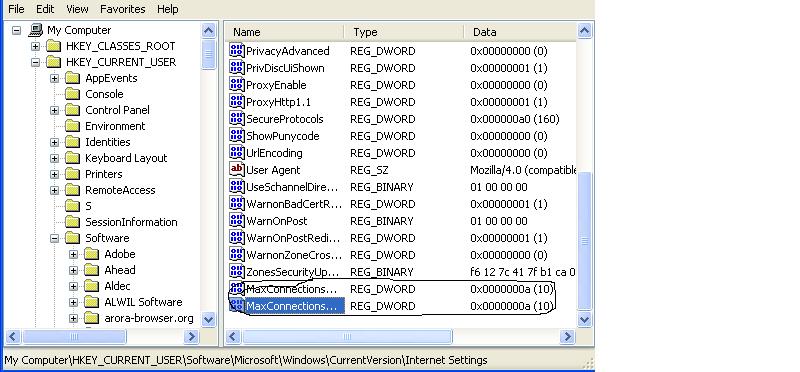
So to download more than two files from a server in single time you have to change the registry values by Regedit

Steps :-
1. Go to  Start ---  Run ---regedit

2.in Registry go to Mycomputer ----HKEY_CURRENT_USER\ Software\Microsoft\Windows\Current Version\InternetSettings

3.Right Click on the Internet Settings and create a Dword MaxConnectionsPerServer give a value in decimal as 10 by change the binary value.

4.Create another Dword MaxConnectionPer1_0Server and give the Value in Decimal as 10.

  thus the work is over and enjoy multiple downloads from a server without third Party Plug ins


In OutLook Configuration which Incoming Protocol IMAP or POP ?

 Most People Like IMAP configuration as incoming mail protocol In Micro Soft Out Look and other email clients  because IMAP does not delete the downloaded mails from server (google or yahoo) .But POP deletes the Mails from the server.
 

In computing, the Post Office Protocol (POP) is an application-layer Internet standard protocol used by local e-mail clients( MicroSoft OutLook, Mozilla Thunder Bird, Evolution Client, IBM Lotus Notes) to retrieve e-mail from a remote server over a TCP/IP connection( Gmail, YahooMail etc., )


POP supports simple download-and-delete requirements for access to remote mailboxes . Although most POP clients have an option to leave mail on server after download, e-mail clients using POP generally connect, retrieve all messages, store them on the user's PC as new messages, delete them from the server, and then disconnect. Other protocols, notably IMAP, (Internet Message Access Protocol) provide more complete and complex remote access to typical mailbox operations. Many e-mail clients support POP as well as IMAP to retrieve messages; however, fewer Internet Service Providers (ISPs) support IMAP.
A POP3 server listens on well-known port 110. Encrypted communication for POP3 is either requested after protocol initiation, using the STLS command, if supported, or by POP3S, which connects to the server using Transport Layer Security (TLS) or Secure Sockets Layer (SSL) on well-known TCP port 995 (e.g. Google Gmail).
 so finally  use of POP configuration in Outlook causes deletion of Mails from Gmail or yahoomail Servers .We cannot retrieve them even though we use Browsers for viewing older mails

The Internet Message Access Protocol (IMAP) is one of the two most prevalent Internet standard protocols for e-mail retrieval, the other being the Post Office Protocol (POP).[ Virtually all modern e-mail clients and mail servers support both protocols as a means of transferring e-mail messages from a server.
is an Application Layer Internet protocol that allows an e-mail client to access e-mail on a remote mail server. The current version, IMAP version 4 revision 1
MAP supports both on-line and off-line modes of operation. E-mail clients using IMAP generally leave messages on the server until the user explicitly deletes them. This and other characteristics of IMAP operation allow multiple clients to manage the same mailbox. Most e-mail clients support IMAP in addition to POP to retrieve messages; however, fewer email services support IMAP.[3] IMAP offers access to the mail store. Clients may store local copies of the messages, but these are considered to be a temporary cache.
Incoming e-mail messages are sent to an e-mail server that stores messages in the recipient's email box. The user retrieves the messages with an e-mail client that uses one of a number of e-mail retrieval protocols. Some clients and servers preferentially use vendor-specific, proprietary protocols, but most support the Internet standard protocols, SMTP for sending e-mail and POP and IMAP for retrieving e-mail, allowing interoperability with other servers and clients. For example, Microsoft's Outlook client uses a proprietary protocol to communicate with a Microsoft Exchange Server server as does IBM's Notes client when communicating with a Domino server, but all of these products also support POP, IMAP, and outgoing SMTP. Support for the Internet standard protocols allows many e-mail clients such as Pegasus Mail or Mozilla Thunderbird (see comparison of e-mail clients) to access these servers, and allows the clients to be used with other servers (see list of mail servers).

Internet Explorer 7,RunOnce URL (runonce.msn.com/runonce2.aspx)error!

After the installation of Internet Explorer 7, you might see a blank page instead of your Homepage, or it may keep loading the RunOnce URL (runonce.msn.com/runonce2.aspx). To fix this issue, add the following registry keys:


Hive: HKEY_CURRENT_USER
Key: \Software\Microsoft\Internet Explorer\Main
Name: RunOnceHasShown
Type: dword
Value: 1
Name: RunOnceComplete
Type: dword
Value: 1

Windows Media Player Error while Connecting to internet

When Windows media Player is connected to internet for some online update or what so ever. It is not connecting to Internet and showing a error message on the screen

                             Windows Media Player Error C00D10B3        


This can be trouble shooted by simply editing the registry.

do the following steps

1.go to Start----Run----regedit

2.go to HKEY_CURRENT_USER\Software\Microsoft\MediaPlayer\Preferences

3. create a new Dword ForceOnlineby right clicking on preferences and give value 1

then from now you cannot get error message


Cannot Access Regedit, How to Fix It?


Cannot Access Regedit, How to Fix It?Many times when working on a computer that has been infected with a virus, trojan, or piece of spyware I find myself with my most important command, Regedit, the Windows Registry Editor being disabled. Virus creators like to disable the Registry Editor so it makes solving the problem and removing the issue difficult.Sometimes administrators in IT departments may place restrictions on using the regedit command to keep employees from changes things on company computers, but viruses and other issues may also try to disable it.Listed below you will find the different ways to enable regedit, the Registry Editor. First we'll begin with the method that appears to work the best.


Method 1 - Enabling the Registry with VBScriptDoug Knox, a Microsoft Most Valuable Professional, has created a VBScript that enables or disables the Registry Editor based on the following location in the registry. Of course, since the registry editor is disabled, you can't change it manually, so Doug wrote a Visual Basic Script to accomplish the task.HKey_Current_User\Software\Microsoft\Windows\CurrentVersion\Policies\System\Visit Doug's page and download Registry Tools VBScript to your desktop, double-click on it to run it, then reboot your computer and try to open the Registry Editor.If this fix didn't solve your problem, try method two shown below.


Method 2: Use Symantec's tool to reset shell\open\command registry keysSometimes worms and trojans will make changes to the shell\open\command registry entries as part of their infections. This will cause the virus to run each time you try to run an .exe file such as the Registry Editor. In these cases, visit Symantec's website and download the UnHookExec.inf file to your desktop. Right-click on it and choose Install. Restart your computer and then try to open the Registry Editor.

Method 3: Rename Regedit.com to Regedit.exeSome viruses and other malware will load a regedit.com file that is many times a zero byte dummy file. Because .com files have preference over .exe files when executed if you type REGEDIT in the run line, it will run the regedit.com instead of the real regedit.exe file. Delete the regedit.com file if its a zero byte file to restore access to REGEDIT. In some cases, such as the W32.Navidad worm, you'll need to rename the REGEDIT file to get it to work.

Method 4: Windows XP Professional and Group Policy EditorIf you have Windows XP Professional and access to an administrative user account, you could change the registry editor options in the Group Policy Editor.Click Start, RunType GPEDIT.MSC and Press EnterGo to the following locationUser ConfigurationAdministrative TemplatesSystemIn the Settings Window, find the option for "Prevent Access to Registry Editing Tools" and double-click on it to change.Select Disabled or Not Configured and choose OKClose the Group Policy Editor and restart your computerTry opening REGEDIT againAlthough there are a few other ways, the above ways I have used with great success in re-enabling the REGEDIT command. If you are interested in more ways to reactive the REGEDIT command, you may want to visit a site called Killian's Guide, that goes into more detail on a variety of ways to get the registry editor to work again

How to block or unblock a website?


If in your office or in any organisation management blocks some websites for their security and convineince.
If we want to see these sites we have to do some modifications in the windows host file residing in system32 folder of windows


How to make the changes ?
go to start-> Run->cmd
then type the following path
notepad c:\WINDOWS\system32\drivers\etc\hosts
notepad opens websites urls are blocked with #block then remove the name and save then the website is unblocked

My Network connection Icon or option Disappered in control Pannel What should I do?

If Networking Settings options in Control Pannel Disappeared then we have a trick in registry by Editing the registry in Windows Operating System


follow the given steps

1. Go to Start --- Run ---regedit

2.go to  HKEY_CURRENT_USER\Control Panel\don't load

3.go to right side frame and find the string ncpa.cpl string   and delete it


I cannot see Administrator in Windows Login Screen

When we boot Windows Operating System .In login or Welcome Screen Administrator account or user name is not Appearing  then we must change or add a new value in registry editor
.
following steps should be done.

1.  goto Start --- Run ----regedit.

2.  goto key HKEY_LOCAL_MACHINE\SOFTWARE\Microsoft\Windows NT\CurrentVersion\Winlogon\SpecialAccounts\UserList

3. Create a Dword name Administrator an give a value 1 by double clicking on it


Illegal System DLL Relocation error!

"Illegal System DLL Relocation"

The system DLL user32.dll was relocated in memory. The application will not run properly. The relocation occurred because the DLL C:\Windows\System32\Hhctrl.ocx occupied an address range reserved for Windows system DLLs. The vendor supplying the DLL should be contacted for a new DLL.

To resolve this problem,
download the following tool from microsoft to fix this issue


download tool

Only google Sites are not Opening in my Pc ?

in simple language, if u can open google like this "64.233.161.100" but not with "www.google.com" then it means that your DNS server is not working properly.
In that case, click on your Connection, the blinking icon in the right hand side. click on properties and double click on Internet protocol.
There'll be an entry there which says:
"OObtain Dns server automatically"
or
"Use the following DNS server address"
choose this second one and type in
"218.248.240.46"
and alternate as "218.248.255.146"
it may fix your problem.

Very very inteligent dangerous worm for Computer


WormPalevo is a malicious worm that will impact your computer and your life
negatively.WormPalevo is a mass mailing type of worm that spreads and attaches itself via
emails.WormPalevo can be seen as another reason to not click on untrustworthy links.WormPalevo
is able to steal your information, invade your privacy as well as send the information which it captures to various malicious
third parties.
Worm.Palevo may go by the following names:
• WormPalevo
• Worm Palevo
WormPalevo may display some of the following symptoms:
• Files will start appearing and disappearing.
• Your computer will become increasingly slow.
• Some of your computer setting may suddenly change.
• It may feel like somebody is watching you.
• It may seem like you have a ghost on your computer.
The best advice that can be offered is for you remove WormPalevo immediately upon detection. You could make use of the
manual removal instructions but you need to be seriously warned that you run the risk of causing even further damage to
your computer if you do something incorrectly.


download tool for this worm

Can a virus hide in a PC's CMOS memory?

Can a virus hide in a PC's CMOS memory?

                                No.
The CMOS RAM in which PC system information is stored and backed up   by batteries is accessible through the I/O ports and not directly  addressable.
That is, in order to read its contents you have to use I/O instructions rather than standard memory addressing techniques.  Therefore, anything stored in CMOS is not directly "in memory". Nothing in a normal machine loads the data from CMOS and executes it, so a virus  that "hid" in CMOS RAM would still have to infect an executable object of some kind in order to load and execute whatever had been written to  CMOS.
A malicious virus can of course *alter* values in the CMOS as   part of its payload, but it can't spread  through, or hide itself in, the  CMOS.   

Further, most PCs have only 64 bytes of CMOS RAM and the use of the  first 48 bytes of this is  predetermined by the IBM AT specification. Several BIOS'es also use many of the "extra" bytes of CMOS to hold their  own, machine-specific settings. This means that anything that a virus stores in CMOS can't be very large. A virus could use some of the   "surplus" CMOS RAM to hide a small part of its body (e.g. its payload,  counters, etc). Any executable code stored there, however, must first   be extracted to ordinary memory in order to be executed.


This issue should not be confused with whether a virus can *modify* the contents of a PC's CMOS RAM. Of course viruses can, as this memory is  not specially protected (on normal PCs), so any program that knows how to change CMOS contents can do so. Some viruses do fiddle with the contents of CMOS RAM (mostly with ill-intent) and these have often been  incorrectly reported as "infecting CMOS" or "hiding in CMOS". An example is the PC boot sector virus EXE_Bug, which changes CMOS settings to indicate that no floppy drives are present

my pendrive cannot be formatted

method 1:

. Open Start Menu >> Run, type regedit and press Enter, this will open the registry editor.

2. Navigate to the following path:

HKEY_LOCAL_MACHINE\SYSTEM\CurrentControlSet\Contro l\StorageDevicePolicies

3. Double click the key WriteProtect in the right pane and set the value to 0 in the Value Data Box and press OK button.


4. Exit Registry, restart your computer and then again re-connect your USB pen drive on your computer. That is it, done.
Reply With Quote
method 2:
1. insert the pendrive
2. dont open or format it directly
3. right click on my computer and go to manage
4. in computer management window click on disk managment option
5. right click on the removable disk (i,h....)
6. select forma

How to scan unread pen or flash drives that cannot read or showing errors?


If the pendrives or flash drives are not getting read or not opening, showing errors

use the following free tool


from the url http://mikelab.kiev.ua/PROGRAMS/ChkFlsh.zip

What is the VBS.Loveletter virus and its NewLove variant?

What is the VBS.Loveletter virus and its NewLove variant?

The ILOVEYOU virus is an email attachment written in Visual Basic and smartly disguised as a love letter. Who wouldn't want to receive a love letter afterall? The email attachment was called LOVE-LETTER-FOR-YOU.TXT.vbs and when opened wrecked havoc throughout a computer system by overwriting files or hiding them throughout the system and in the case of people using Microsoft Outlook it sent a copy of the virus to everyone in the computer's address book.

The Love Bug infects files with the following extensions: "vbs", "vbe", "js", "jse", "css", "wsh", "sct", "hta", "jpg", "jpeg", "mp3", or "mp2". Except for "mp3" and "mp2" files, the virus overwrites the whole file with its virus code and the original file is destroyed.

For "vbs" and "vbe" files the virus does not change the host filename.

For "js", "jse", "css", "wsh", "sct" or "hta" files
It changes the filename to ".vbs" (For example: MyStyleSheetFile.css is renamed as MyStyleSheetFile.vbs).

For "jpg" and "jpeg" files
It changes the filename to ".vbs" (For example: MyJPEGFile.jpg is renamed as MyJPEGFile.jpg.vbs).

For "mp3", or "mp2" files
It changes the attribute of the original audio file as the hidden system file and creates a copy of the virus self in the filename of ".vbs" (For example: with MyMP3File.mp3, the virus makes a copy of itself as a file called MyMP3File.mp3.vbs). Therefore, all "mp2" and "mp3" files can be recovered from an infected system.


Once executed, this virus drops the following files:
          \windows\Win32DLL.vbs          \system\MSKernel32.vbs                        \system\LOVE-LETTER-FOR-YOU.TXT.vbs.
                                                                       \system\LOVE-LETTER-FOR-YOU.HTM


It also modifies the following registry entries so that the virus is executed at each Windows starts up:
 

HKEY_LOCAL_MACHINE\Software\Microsoft\Windows\ CurrentVersion\Run\MSKernel32" :\windows\system \MSKernel32.vbs

HKEY_LOCAL_MACHINE\Software\Microsoft\Windows\CurrentVersion\RunServices\Win32DLL” :\windows\\Win32DLL.vbs
It searches for a file named WinFAT32.exe in the :\Windows\system folder. If the file does not exist, it modifies Internet Explorer’s startup page with one of the following sites:

http://www.skyinet.net/~young1s/
HJKhjnwerhjkxcvytwertnMTFwetrdsfmhPnjw6587345gvsdf7679njbvYT/
WIN-BUGSFIX.exe

http://www.skyinet.net/~angelcat/skladjflfdjghKJnwetryDGFikjUIy
qwerWe546786324hjk4jnHHGbvbmKLJKjhkqj4w/WIN-BUGSFIX.exe http://www.skyinet.net/~koichi/jf6TRjkcbGRpGqaq198vbFV5hf
FEkbopBdQZnmPOhfgER67b3Vbvg/WIN-BUGSFIX.exe

http://www.skyinet.net/~chu/sdgfhjksdfjklNBmnfgkKLHjkqwtuHJBh
AFSDGjkhYUgqwerasdjhPhjasfdglkNBhbqwebmznxcbvnmadshfgqw
237461234iuy7thjg/WIN-BUGSFIX.exe

It also searches your system for a file called WIN-BUGSFIX.exe (same as WinFAT32.exe). Before searching the file, the virus first checks whether the key Download Directory located at HKEY_CURRENT_USER\Software\Microsoft\Internet Explorer\
contains a value. If it does, the virus proceeds to look for the file WIN-BUGSFIX.EXE at the path specified in the Download Directory key. But if the registry key does not contain any value, then the virus looks for WIN-BUGSFIX.EXE at C:\. VBS_LOVELETTER and then modifies Internet Explorer’s startup page to “about:blank”.

It also modifies the registry key to : HKEY_LOCAL_MACHINE\Software\Microsoft\Windows\
CurrentVersion\Run\WIN-BUGSFIX, \WIN-BUGSFIX.exe if Download Directory contains a value, or to HKEY_LOCAL_MACHINE\Software\Microsoft\Windows\
CurrentVersion\Run\WIN-BUGSFIX ,C:\WIN-BUGSFIX.EXE if it does not contain a value.

The file WIN-BUGSFIX.EXE is actually a password stealing Trojan.

How Do I Remove the Virus?


Unfortunately after the virus has struck there's not much that can be done to retrieve the destroyed data except to reload the destroyed files from a backup. However, after updating your anti-virus program or buying one, then follow these steps to correct the registry and get your computer working again.

Using the REGEDIT program, remove the following keys from your Windows registry.

HKEY_LOCAL_MACHINE\Software\Microsoft\Windows\CurrentVersion \Run\ MSKernel32=C:\WINDOWS\SYSTEM\MSKernel32.vbs

HKEY_LOCAL_MACHINE\Software\Microsoft\Windows\CurrentVersion \RunServices\ Win32DLL=C:\WINDOWS\Win32DLL.vbs

Not comfortable with Regedit? You can download a small free program called Love_Letter_Clean.exe from Computer Associates, Inc. that automatically removes the registry keys for you. It's available here. When you click on the link, select "Open this file from it's current location" and click OK, or visit any of the top virus protection site like McAfee, Norton, or Trend Micro to download a similar program..

Finally, let's straighten out your IE home page, which the virus reset to www.skyinet.net. From IE's Tools menu, select Internet Options. Right at the top of the dialog you'll see the Home page setting. Type in the URL of the page you use for your home page, and click Ok. That should be it. If you followed all the steps above your system should be free and clean from this painful love letter.

Information on NewLove - a far more dangerous worm/virus

On May 19th a far more dangerous variation of the LoveLetter worm struck, the worm spreads via Microsoft Outlook and sends itself to everyone in the address book just like its predecessor, but this version overwrites ALL files that are not currently in use at the time of the infection. Thus destroying most everything on the hard drive. It also is more dangerous because it changes the wording in the subject line and the name of the attachment it sends by picking a random filename from the users Start folder or making one up.

How to remove porn sites interrupting in your home computer


Many people may enconter these problem while browsing on your home computer .

i.e,, porn sites coming in to the picture. some sites ,unknown tool bars in the internet explorers,
unwanted interrupting messages such as your computer contains large porn matter.download this software to remove these with some porn matter. use the related link given below


These can distrub you so much .

there is way to remove these.

use this link it is very use ful . It is free and very very useful


down load the file and first scan with it

and then in safemode heal the infected files and the rgistry any thing else in your computer.

follow the instructions from the site and do as in the procedure given in the webpage